
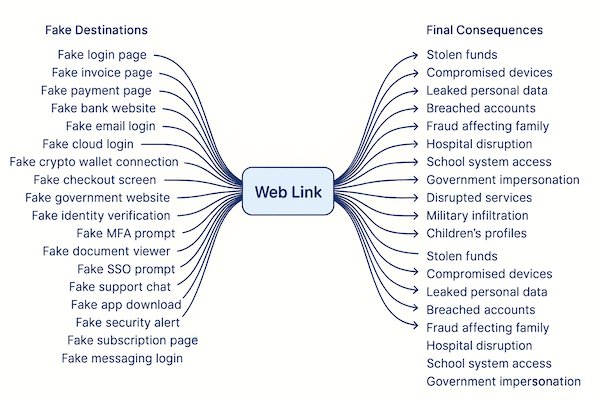
A landscape diagram with the words Web Link in the centre, with lines branching out to different fake destinations on the left and a range of real world consequences on the right.

The Real Mechanics of Phishing and the Behaviour That Makes It Possible

90% of cybercrime begins with phishing and it usually comes down to one moment. A person interacts with a link they can’t assess after it slips past the security tools they rely on. This is why the link isn’t just the starting point for most attacks. It’s the single place where the entire chain can be broken. If people were protected from engaging with dangerous links, almost every attack would collapse before any harm could occur.

Some of the places where people might encounter a dangerous link

  • Email
  • Direct message
  • Text message
  • Social media post
  • Social media comment
  • AI chatbot
  • Online ad
  • Google Search
  • PDF
  • Spreadsheet
  • Word document
  • Presentation file
  • Team collaboration message
  • Team collaboration shared file
  • Messaging app
  • Encrypted messaging app
  • Community or group message
  • Forum post
  • In app notification
  • Browser notification
  • Calendar invite
  • Contact request
  • Support chat
  • Customer service window
  • QR code
  • Smartphone widget
  • Pop up window
  • Website banner
  • Login prompt inside an app
  • Update prompt
  • Shared bookmark
  • Shared clipboard
  • Public WiFi landing page
  • Voicemail transcription
  • VR
  • AR
  • Wearable device notification

Where the link might go

When someone clicks or taps a link they can be taken anywhere the attacker chooses. It can look familiar, official, or completely routine, which is why people rarely notice anything wrong at this stage. The link can lead to any kind of page or screen designed to make the victim act without thinking.

  • Login page
  • Website
  • App download
  • Web app
  • AI chatbot
  • Messaging interface
  • Identity verification flow
  • Password reset flow
  • MFA challenge
  • Account recovery flow
  • Payment screen
  • Checkout screen
  • Document viewer
  • File share
  • System notification
  • Browser permission request
  • Software update prompt
  • Security alert
  • Subscription renewal prompt
  • Delivery or courier update
  • Government service
  • Social media profile
  • Remote access request
  • Screen sharing request
  • Device unlock request
  • Investment opportunity
  • Crypto transaction flow
  • QR code landing
  • Emergency alert

What might happen next

Once the victim reaches any of the destinations, the following can happen:

  • Account takeovers
  • Payment diversion fraud
  • Invoice fraud
  • Payroll redirection
  • Online banking fraud
  • Cloud account compromise
  • Remote access trojans
  • Malware downloads
  • Spyware installation
  • Ransomware staging
  • Identity theft
  • Session hijacking
  • Social media account theft
  • SIM swap set up
  • Business email compromise
  • Financial fraud across banking, crypto, and fintech
  • Data breaches
  • Document theft
  • Credential harvesting
  • MFA interception
  • Reverse proxy credential replay
  • OAuth permission abuse
  • Forced reauthentication traps
  • Cookie theft
  • App impersonation flows
  • Fake checkout and payment screens
  • Recovery email compromise
  • Password reset interception
  • Full device compromise through mobile browsers
  • Messaging app compromise involving friends, family, and children
  • Parental account compromise affecting school portals and child identity records
  • Telehealth and hospital system compromise
  • Access to medical device accounts
  • Interference with hospital scheduling systems
  • Compromise of government portals for tax, benefits, or voting information
  • Account hijacking involving politicians or public figures
  • Compromise of emergency services
  • Access to military email or logistics systems
  • Compromise of school networks through staff or parental accounts
  • Compromise of child related gaming or social accounts
  • Compromise of local councils, utilities, or transport systems through administrative access

The end result

After the attacker succeeds with any of the actions in the previous list, the consequences in the list below can follow. These are the real world outcomes that affect people, families, businesses, and entire communities.

  • Financial loss
  • Data loss
  • Identity theft
  • Privacy violations
  • Empty bank accounts
  • Empty crypto wallets
  • Unauthorised transfers
  • Fraudulent purchases
  • Payroll redirection
  • Company wide lockouts
  • System outages
  • Ransomware disruption
  • Permanent data loss
  • Reputational damage
  • Legal exposure
  • Regulatory penalties
  • Customer churn
  • Supplier exposure
  • Family exposure
  • Children targeted through compromised accounts
  • Harassment through hijacked social profiles
  • Loss of access to school or medical portals
  • Delayed medical treatment
  • Hospital service disruption
  • Emergency service disruption
  • Shutdown of government services
  • Disinformation campaigns
  • Spread of disinformation that leads to a breakdown in where to find trust
  • Exposure of military personnel
  • Risks to national security
  • Utility outages
  • Transport disruption
  • Loss of employment
  • Long term psychological stress
  • Loss of trust in essential services

Now that the framing is clear, we can go back to the behavioural reality behind phishing.

Phishing has never been a sophisticated problem.

People are constantly told to stay alert because everyone understands the truth that sits underneath the advice. No security system can recognise a phishing link it has never seen before. This leaves people trying to protect themselves with guesswork. They check the logo. They check the wording. They wonder whether the timing feels right. They try to judge whether a message looks normal or trustworthy. They’re expected to make sense of something that’s designed to imitate the real thing, and they’re expected to do it without any reliable help from the systems that are meant to protect them.

This forces people into decisions they’re not equipped to make. They’re left to compare colours, layout, and familiar patterns. They look for clues that might separate genuine from fraudulent, even though criminals copy the real experience with almost perfect accuracy. People reach these moments alone, without meaningful support, and the design of the attack plays directly into their instinct to trust what feels familiar.

Phishing works because criminals use simple cues to make something look routine. They don’t need advanced tools or clever tricks. They rely on timing, repetition, and familiarity. When something looks like what a person expects to see, the person follows the flow without realising they’ve been shifted into an imitation. The entire journey is built around influencing a single decision, and once that decision is made everything that follows becomes unavoidable.

The industry keeps treating this as a complicated threat, yet it only succeeds because every security system begins from the wrong assumption. Links are treated as safe unless they’ve already been marked as dangerous, which means an attacker only needs to use something new for the system to fail. If we change that assumption and treat every link as untrusted until it’s verified as legitimate, we cut the attack off at the one point that matters. That single shift removes the conditions needed for every outcome in the lists above. When the link is verified before trust is formed, the entire chain of harm collapses before it begins.

Leave a Reply

Your email address will not be published. Required fields are marked *

Stay informed with MetaCert’s latest updates, expert analysis, and real examples exposing how digital deception works and how it can be stopped.

A landscape diagram with the words Web Link in the centre, with lines branching out to different fake destinations on the left and a range of real world consequences on the right.

The Real Mechanics of Phishing and the Behaviour That Makes It Possible

90% of cybercrime begins with phishing and it usually comes down to one moment. A person interacts with a link they can’t assess after it slips past the security tools they rely on. This is why the link isn’t just the starting point for most attacks. It’s the single place where the entire chain can be broken. If people were protected from engaging with dangerous links, almost every attack would collapse before any harm could occur.

Some of the places where people might encounter a dangerous link

  • Email
  • Direct message
  • Text message
  • Social media post
  • Social media comment
  • AI chatbot
  • Online ad
  • Google Search
  • PDF
  • Spreadsheet
  • Word document
  • Presentation file
  • Team collaboration message
  • Team collaboration shared file
  • Messaging app
  • Encrypted messaging app
  • Community or group message
  • Forum post
  • In app notification
  • Browser notification
  • Calendar invite
  • Contact request
  • Support chat
  • Customer service window
  • QR code
  • Smartphone widget
  • Pop up window
  • Website banner
  • Login prompt inside an app
  • Update prompt
  • Shared bookmark
  • Shared clipboard
  • Public WiFi landing page
  • Voicemail transcription
  • VR
  • AR
  • Wearable device notification

Where the link might go

When someone clicks or taps a link they can be taken anywhere the attacker chooses. It can look familiar, official, or completely routine, which is why people rarely notice anything wrong at this stage. The link can lead to any kind of page or screen designed to make the victim act without thinking.

  • Login page
  • Website
  • App download
  • Web app
  • AI chatbot
  • Messaging interface
  • Identity verification flow
  • Password reset flow
  • MFA challenge
  • Account recovery flow
  • Payment screen
  • Checkout screen
  • Document viewer
  • File share
  • System notification
  • Browser permission request
  • Software update prompt
  • Security alert
  • Subscription renewal prompt
  • Delivery or courier update
  • Government service
  • Social media profile
  • Remote access request
  • Screen sharing request
  • Device unlock request
  • Investment opportunity
  • Crypto transaction flow
  • QR code landing
  • Emergency alert

What might happen next

Once the victim reaches any of the destinations, the following can happen:

  • Account takeovers
  • Payment diversion fraud
  • Invoice fraud
  • Payroll redirection
  • Online banking fraud
  • Cloud account compromise
  • Remote access trojans
  • Malware downloads
  • Spyware installation
  • Ransomware staging
  • Identity theft
  • Session hijacking
  • Social media account theft
  • SIM swap set up
  • Business email compromise
  • Financial fraud across banking, crypto, and fintech
  • Data breaches
  • Document theft
  • Credential harvesting
  • MFA interception
  • Reverse proxy credential replay
  • OAuth permission abuse
  • Forced reauthentication traps
  • Cookie theft
  • App impersonation flows
  • Fake checkout and payment screens
  • Recovery email compromise
  • Password reset interception
  • Full device compromise through mobile browsers
  • Messaging app compromise involving friends, family, and children
  • Parental account compromise affecting school portals and child identity records
  • Telehealth and hospital system compromise
  • Access to medical device accounts
  • Interference with hospital scheduling systems
  • Compromise of government portals for tax, benefits, or voting information
  • Account hijacking involving politicians or public figures
  • Compromise of emergency services
  • Access to military email or logistics systems
  • Compromise of school networks through staff or parental accounts
  • Compromise of child related gaming or social accounts
  • Compromise of local councils, utilities, or transport systems through administrative access

The end result

After the attacker succeeds with any of the actions in the previous list, the consequences in the list below can follow. These are the real world outcomes that affect people, families, businesses, and entire communities.

  • Financial loss
  • Data loss
  • Identity theft
  • Privacy violations
  • Empty bank accounts
  • Empty crypto wallets
  • Unauthorised transfers
  • Fraudulent purchases
  • Payroll redirection
  • Company wide lockouts
  • System outages
  • Ransomware disruption
  • Permanent data loss
  • Reputational damage
  • Legal exposure
  • Regulatory penalties
  • Customer churn
  • Supplier exposure
  • Family exposure
  • Children targeted through compromised accounts
  • Harassment through hijacked social profiles
  • Loss of access to school or medical portals
  • Delayed medical treatment
  • Hospital service disruption
  • Emergency service disruption
  • Shutdown of government services
  • Disinformation campaigns
  • Spread of disinformation that leads to a breakdown in where to find trust
  • Exposure of military personnel
  • Risks to national security
  • Utility outages
  • Transport disruption
  • Loss of employment
  • Long term psychological stress
  • Loss of trust in essential services

Now that the framing is clear, we can go back to the behavioural reality behind phishing.

Phishing has never been a sophisticated problem.

People are constantly told to stay alert because everyone understands the truth that sits underneath the advice. No security system can recognise a phishing link it has never seen before. This leaves people trying to protect themselves with guesswork. They check the logo. They check the wording. They wonder whether the timing feels right. They try to judge whether a message looks normal or trustworthy. They’re expected to make sense of something that’s designed to imitate the real thing, and they’re expected to do it without any reliable help from the systems that are meant to protect them.

This forces people into decisions they’re not equipped to make. They’re left to compare colours, layout, and familiar patterns. They look for clues that might separate genuine from fraudulent, even though criminals copy the real experience with almost perfect accuracy. People reach these moments alone, without meaningful support, and the design of the attack plays directly into their instinct to trust what feels familiar.

Phishing works because criminals use simple cues to make something look routine. They don’t need advanced tools or clever tricks. They rely on timing, repetition, and familiarity. When something looks like what a person expects to see, the person follows the flow without realising they’ve been shifted into an imitation. The entire journey is built around influencing a single decision, and once that decision is made everything that follows becomes unavoidable.

The industry keeps treating this as a complicated threat, yet it only succeeds because every security system begins from the wrong assumption. Links are treated as safe unless they’ve already been marked as dangerous, which means an attacker only needs to use something new for the system to fail. If we change that assumption and treat every link as untrusted until it’s verified as legitimate, we cut the attack off at the one point that matters. That single shift removes the conditions needed for every outcome in the lists above. When the link is verified before trust is formed, the entire chain of harm collapses before it begins.
Leave a Reply

Your email address will not be published. Required fields are marked *

Stay informed with MetaCert’s latest updates, expert analysis, and real examples exposing how digital deception works and how it can be stopped.

Recent blog posts